Should AI agents like Codex be used to translate PDFs?

DL.Translator
Jul 02, 2026
Why is it not recommended to use Codex and similar AI Agents to directly translate PDFs?
Brief Conclusion
AI agents can help you read PDFs, summarize content, explain terminology, review key paragraphs, and also temporarily translate portions of text. But if the goal is to deliver a formal PDF translation that preserves formatting, is downloadable, and reviewable, it is usually not the most stable primary workflow.
The reason is that professional PDF translation is not simply about feeding text to a model. It is more like a document engineering workflow: parsing fixed layouts, determining reading order, processing text layers and OCR, translating while maintaining terminology consistency, then rebuilding the translation into the original page structure. For contracts, product manuals, technical documentation, and cross-border collaboration materials, delivery stability is more critical than whether a model can handle translation.
If you simply need to quickly comprehend a document, Codex, ChatGPT Agent, or other AI automation tools are very valuable. If you need to formally deliver a delivery-ready PDF, specialized document translation tools like DL.Translator are more suitable.
Can AI agents translate PDFs?
Yes, but it's important to distinguish between 'content translation' and 'finished PDF delivery.'
AI agents excel at reading text, invoking scripts, extracting tables, generating summaries, and can also produce natural translations for specific pages based on context. For ad hoc understanding of contract terms, organizing technical manual terminology, and checking the accuracy of English product descriptions, it is a good assistant.
But PDF is a fixed-layout file. Text on a page is not always continuous paragraphs, but may be character blocks, text boxes, headers and footers, footnotes, table cells, and figure captions positioned by coordinates. Proper PDF translation requires identifying these structures and reassembling the layout after translation.
This step determines whether the translated document can be used as a formal deliverable.
AI agent vs Specialized PDF Translation Tools
| Dimension | AI agent | Specialized PDF Translation Tools |
|---|---|---|
| Most Suitable Tasks | Reading, summarization, Q&A, terminology discussion, key paragraph proofreading | Translate entire PDF and output downloadable translated file |
| Cost Predictability | Affected by context length, tool calls, retries, and multiple proofreading rounds | Typically based on document statistics, page count, or tokens, easier to estimate |
| Layout Preservation | Requires temporary extraction, rearrangement, or scripting; stability dependent on specific files | Has a fixed workflow of layout parsing, OCR, translation, and layout reconstruction |
| Terminology Consistency | Can maintain glossaries, but requires repeatedly providing context in long documents | Better suited for applying glossary consistency at the full document level |
| Scanned PDF | Requires additional OCR, coordinate backfilling, and visual inspection | Typically built-in OCR with page-level reconstruction mechanisms |
| Delivery Format | Better suited for outputting explanations, Markdown, excerpts, or review comments | Better suited for outputting delivery-ready PDFs or bilingual review files |
The challenge of PDF translation is document engineering
The core advantage of PDF is display consistency, and the core challenge is also display consistency. It does not naturally preserve editable paragraph flows like Word documents, but rather resembles a page snapshot with text coordinates, images, vector graphics, and font information.
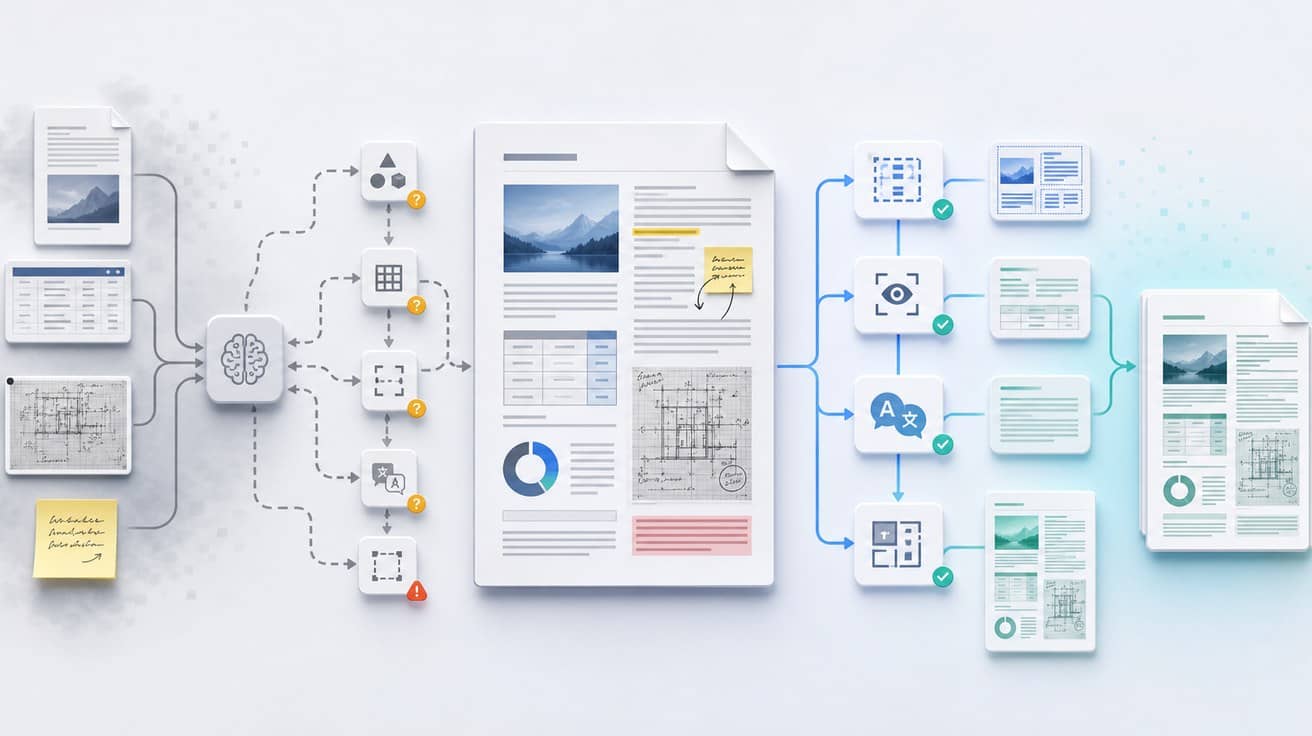
A reliable PDF translation workflow must handle at least four things:
- Layout Analysis: Identify body text, headers and footers, footnotes, captions, tables, images, and reading order.
- Text & OCR: Determine whether the PDF has a usable text layer; scanned documents require OCR first, followed by positioning the recognized results back to the page.
- Translation & Terminology Control: Ensure contractual terms, product names, and technical terminology remain consistent throughout the entire document.
- Layout Reconstruction & Visual Verification: Place translated text back into the original layout, checking for overflow, occlusion, sequence errors, omissions, and pagination issues.
AI agents can participate in certain steps, but if the workflow is assembled ad hoc for each PDF, costs and results will be difficult to stabilize. The value of professional tools lies in productizing these steps, so users don't have to redesign the workflow for every formal document.
DL.Translator's existing PDF formatting preservation article also explains why the key to PDF translation is not simply replacing text, but intelligent layout reconstruction.
With long PDFs, agent costs can shift from linear to superlinear
Short PDFs are usually more manageable. Extracting text, segmented translation, and one round of review—costs roughly scale with page count or word count.
But long PDFs are different. To maintain terminology and tone consistency, agents often need to repeatedly carry previous summaries, glossaries, translation history, current page screenshots, OCR results, and issues to be checked. The more pages there are, the more repeated context; the more rounds, the more tool calls and model inputs.
Formal documents typically require multiple rounds of processing:
- Extract text and page structure.
- Identify the sequence of body text, tables, figure captions, and footnotes.
- Translate the body text and apply glossaries.
- Check terminology consistency.
- Retry after discovering missing pages, sequence errors, or OCR errors.
- Re-layout pages and handle overflow.
- Perform manual or visual verification.
Each additional round may require re-reading large sections of context. For contracts spanning dozens of pages, product manuals running hundreds of pages, or multilingual technical materials, the real unpredictability lies not in the single model invocation cost, but in context repetition, failed retries, and manual rework.
This is also why formal document translation requires more predictable, cacheable, and retriable specialized workflows.
When can you use an agent?
When your goal is to understand or assist with proofreading, agents are well-suited.
You can have an agent help you:
- Summarize the main content of a long PDF.
- Explain difficult passages in contracts, product manuals, or technical documentation.
- Extract terminology and generate a glossary draft.
- Compare source text and translation to identify suspected mistranslations.
- Polish a few key paragraphs.
- Help cross-border teams quickly understand document risk points.
In other words, agents are suitable for 'comprehending, analyzing, and assisting judgment.'They can be placed before or after the professional translation workflow to help you make decisions and conduct reviews faster.
When should you use DL.Translator?
If your PDF needs to enter formal collaboration, client delivery, or internal archival processes, it is recommended to prioritize specialized tools like DL.Translator.
Especially in the following scenarios:
- Contracts, quotations, product manuals, technical specifications, and other formal documents.
- Documents containing tables, charts, headers and footers, footnotes, or multi-column layouts.
- Scanned PDFs that require OCR.
- Translations need to retain original layout retention.
- Multi-party collaboration requires glossary consistency.
- Preview is needed before deciding whether to complete the full translation.
- A deliverable PDF download is needed rather than plain text only.
DL.Translator's Free Document Translation Preview allows you to check translation quality and layout effects before paying; If you need to standardize product names, brand names, and technical terminology, you can refer to the Glossary Management Guide.
FAQ
Does AI agent PDF translation cost scale linearly?
Not necessarily. Short PDFs or plain text PDFs typically scale near-linearly; Long PDFs, scanned documents, complex tables, and multiple rounds of proofreading can cause costs to scale super-linearly. The main causes are repeated context, OCR, tool calls, layout reconstruction, and failure retries.
Why are PDFs more difficult to translate than plain text?
PDF text is typically stored by page coordinates, not necessarily as continuous paragraphs. Translated text length changes, and fonts, tables, images, footnotes, headers, footers, and pagination must also be handled, so the difficulty lies in document engineering, not just language conversion.
Are Codex or ChatGPT Agent completely unusable for PDF translation?
No. They are suitable for reading PDFs, extracting terminology, interpreting paragraphs, generating summaries, and post-editing. However, when the objective is to output a complete translated PDF with stable formatting, specialized PDF translation tools are typically more reliable.
Why are scanned PDFs more difficult?
Scanned PDFs are essentially images. The system needs to first use OCR to recognize text, then position the recognition results back to page coordinates, and handle issues like skewing, low resolution, background textures, and overlapping graphics and text. Any error in these steps will affect translation accuracy and layout restoration.
What is the more recommended workflow?
The more reliable approach is: first use DL.Translator to generate a previewable and downloadable translated PDF, then use an agent to review key passages, terminology, and risk points. This retains the delivery stability of specialized tools while leveraging the analytical capabilities of the agent.
Conclusion
AI agents like Codex are well-suited for helping you understand PDFs, and also suitable for terminology consolidation, summarization, and review before and after translation. However, when the goal is to deliver a formal translated PDF with stable layout, consistent terminology, and downloadable output, PDF translation requires a document processing pipeline, not just an intelligent model.
When quick content comprehension is needed, use an agent. When formal translated PDF delivery is needed, use DL.Translator Document Translation—preview first, then complete the full translation.